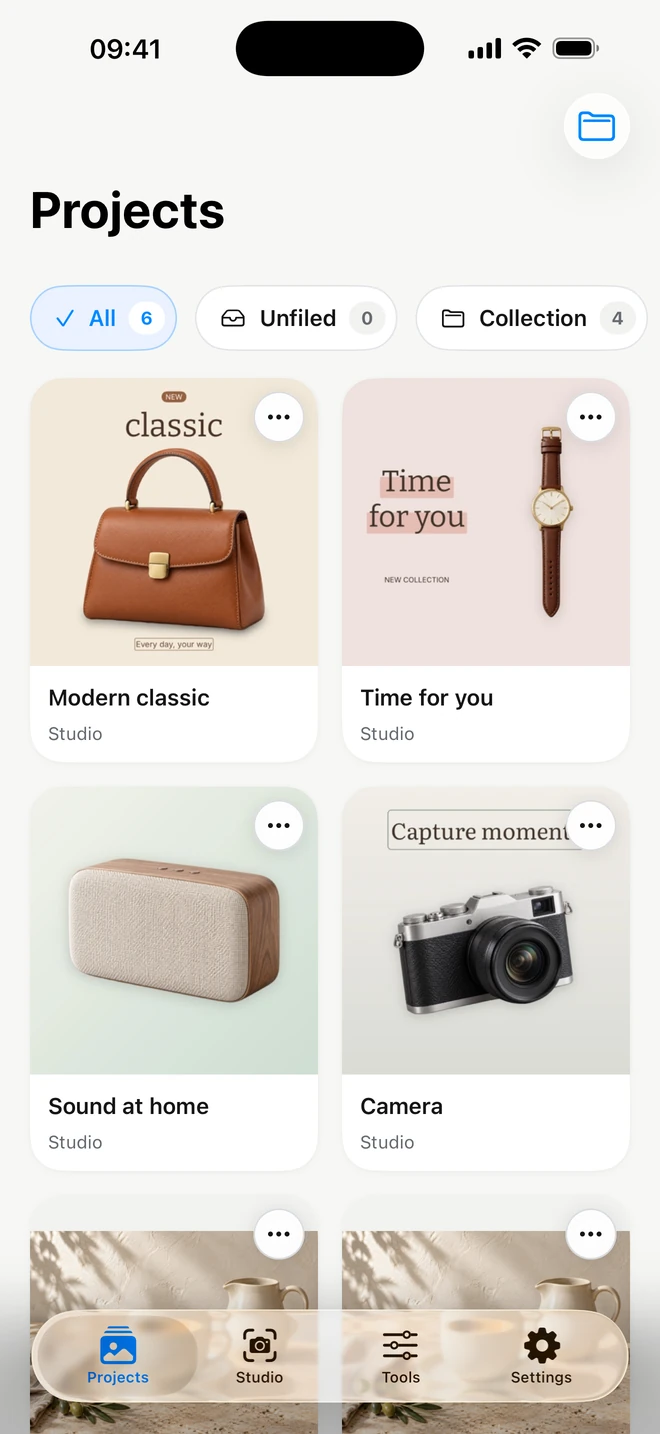
Background removal, composition and every Tools transformation run on your iPhone. Photos are not sent to ItemShot servers. Keep finished and unfinished work in one library. A label on each card shows whether it belongs to Studio or Tools.
Background removal, composition and every Tools transformation run on your iPhone. Photos are not sent to ItemShot servers.
What you can adjust
On-device processing
Preserved source
Export to your chosen destination
Projects and originals are stored on the device; backups follow Apple settings. A cloud import may need to download first, and sharing sends a file to your chosen destination. Apple handles purchases and restoration of Pro.
For example
Edit a locally available photo on device and choose where to send the finished copy.
Projects, folders and returning to a photo
Keep finished and unfinished work in one library. A label on each card shows whether it belongs to Studio or Tools.
What you can adjust
Shared library
Folders and names
Editable settings
Create folders, organize work and reopen it with its settings. A saved project belongs to a specific photo. In Tools, ordinary project saving and repeat export are free; they are different from Pro settings reusable on new photos.
For example
Organize collections in folders and return to a photo to change its text or size.
Photo information and a copy without personal metadata
Inspect dimensions, format, file size and available camera, capture and location information. Then prepare a copy without personal data.
What you can adjust
Source information
Prepare a clean copy
Inspect the result’s data
Cleanup removes personal metadata such as GPS and camera details. The app shows information from the prepared copy; final saving happens through Export. The original and saved project source are untouched. This does not erase visible text in the photo.
For example
Before publishing, check for location data and remove personal metadata from the output file.
22 languages, storage and Pro management
Choose your interface language and keep track of local app data. Settings brings together storage, privacy and subscription information.
What you can adjust
22 interface languages
Storage and cache cleanup
Restore purchases
See occupied space and project/folder counts, clear rebuildable cache, or separately delete work with confirmation. Restore purchases and manage the subscription through Apple. Changing language needs no new ItemShot account: there is no such account.
For example
Clear temporary data while keeping projects, or restore Pro with the Apple account used for purchase.
Bring your photo→Processed on your iPhone→Save and share
Good questions. Clear answers.
Does every part of the app work without internet?+
Photo processing is local. Fetching a photo from iCloud or Files, purchases, restoration and sharing to online services may still need a connection.
Does removing metadata change the original?+
No. Tools can remove personal metadata from the exported copy. The original and saved source may still contain that information.
Which parts are free?+
Studio includes 10 Standard exports per calendar month at up to 2048 pixels. Single-photo Tools editing, saving and export have no monthly quota. Pro adds full-resolution Studio output, advanced editing, batches and saved settings.
Which formats can I export?+
Studio exports JPEG and PNG, including transparent PNG. Tools converts between JPEG, PNG, HEIC and WebP. Outputs are re-encoded in SDR.
 ItemShot