Several captions in one composition
Add a name, a short feature, a price or an explanation. A project supports up to 24 separate text layers.
What you can adjust
- Up to 24 captions
- List and duplicate
- Position and stacking order
The 1.3 update brings practical photo Tools and more creative control in Studio.

More ways to finish your product photos: • Add text with fonts, colors and four backdrop styles. • Move, resize and rotate elements directly on the canvas; refine the look with improved Pro shadows. • Use the new Tools editor to crop, resize, compress, convert formats and remove personal metadata before a single export. Single-photo Tools are free. Batch processing and your saved settings are included in Pro. The interface now supports 22 languages.
Add a name, a short feature, a price or an explanation. A project supports up to 24 separate text layers.
What you can adjust
A backdrop can reinforce the style or keep words readable over a busy photo. Turn it off when you want text alone.
What you can adjust
Choose a layer through Elements, or select the product or text on the canvas. The outline shows what you are editing.
What you can adjust
A shadow connects a cutout to its new background. Pro includes Soft, Directional and Under product shadows.
What you can adjust
Remove unwanted edges, change orientation or correct a tilted photo without starting another project.
What you can adjust
Keep the original size, enter width and height, limit the longest side or scale the image by a percentage.
What you can adjust
Convert between JPEG, PNG, HEIC and WebP in one editor. New imports select their supported source format automatically.
What you can adjust
Reduce the file for uploading, sending or meeting a service’s requirements. The target-size field clearly switches between KB and MB.
What you can adjust
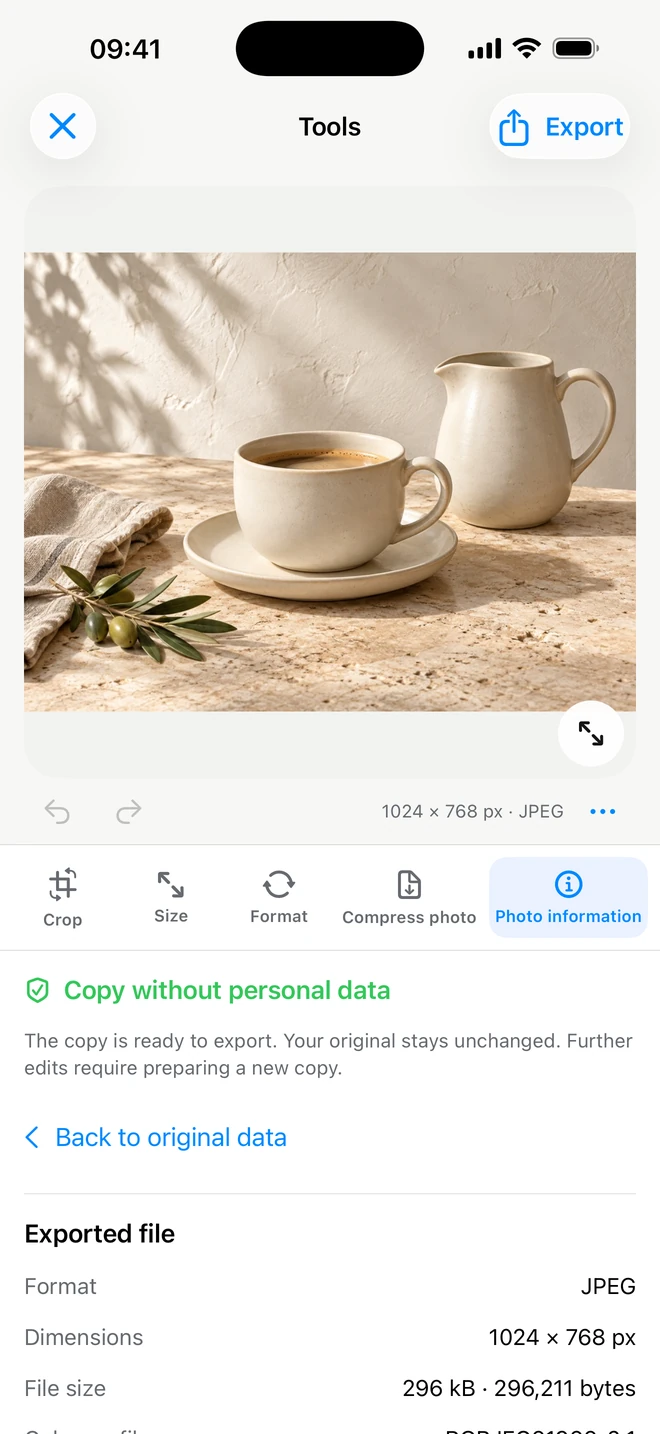
Inspect dimensions, format, file size and available camera, capture and location information. Then prepare a copy without personal data.
What you can adjust
When a successful setup will be useful again, save it with Pro and apply it to new photos.
What you can adjust
Keep finished and unfinished work in one library. A label on each card shows whether it belongs to Studio or Tools.
What you can adjust
Choose your interface language and keep track of local app data. Settings brings together storage, privacy and subscription information.
What you can adjust
Start with your own photo. Find its best angle in ItemShot.
For iPhone · iOS 18 or later